Staging
A neutralized copy of an instance on any server, on the commits that are live.
A staging copy is a second instance made from the first: the same code on the same commits, a copy of the database and filestore, on a server of your choosing. It is where an upgrade is rehearsed, a module tried, or a change shown to a customer, without touching production.
Making a copy
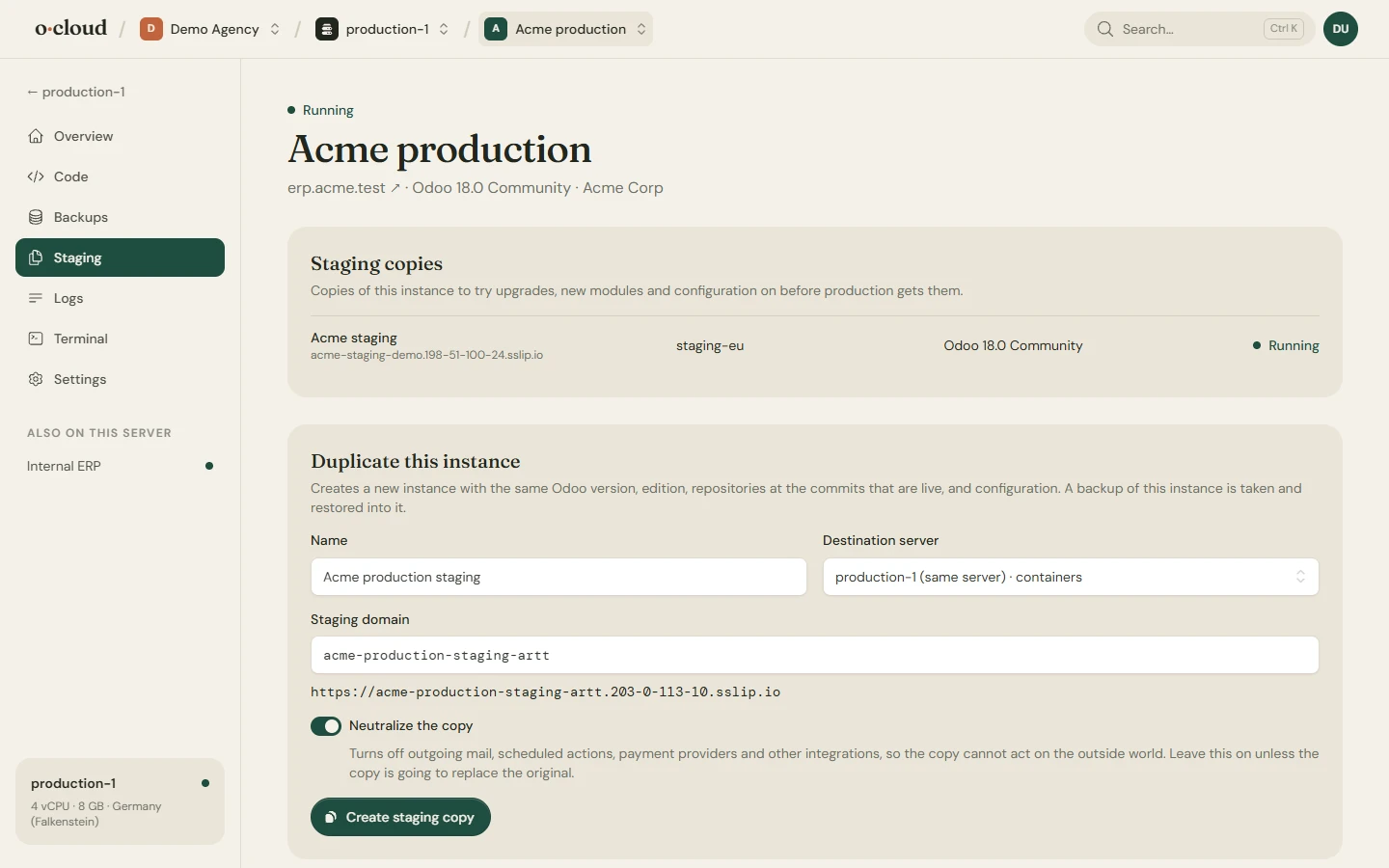
Staging on the instance, pick a server, give it a name. Any ready server will do, also the one the original runs on, where the copy gets a database of its own. The copy is made from a fresh backup of the original.
Neutralized by default
A copy would otherwise send the same mails, run the same scheduled actions and talk to the same payment providers as production. By default those are switched off in the copy. Switch neutralization off only when you know why.
On the commits that are live
The copy runs exactly the commits production runs, of the main repository and every addon repository. Update the copy to a newer commit to try it; production stays where it is until you update it too.
Keeping track
Copies are marked Staging on the instances page, and the filter there shows only production or only staging. The original's Staging page lists its copies. Delete a copy when you are done; it is an ordinary instance and takes the room of one.
Rehearsing an upgrade
- Make a copy of production.
- On the copy, update the repositories to the branch or commit of the new version, or move to a newer Odoo version through Odoo's upgrade service.
- Check the copy, with Login as and the logs.
- Do the same on production, with a fresh backup first.