AI assistant and API
Connect Claude, ChatGPT, Cursor, VS Code, Claude Code or Codex with a key, and the REST API.
An AI assistant is connected with a key of the team. The key decides what it may do, and everything it changes is written down. The same keys drive the REST API.
Keys
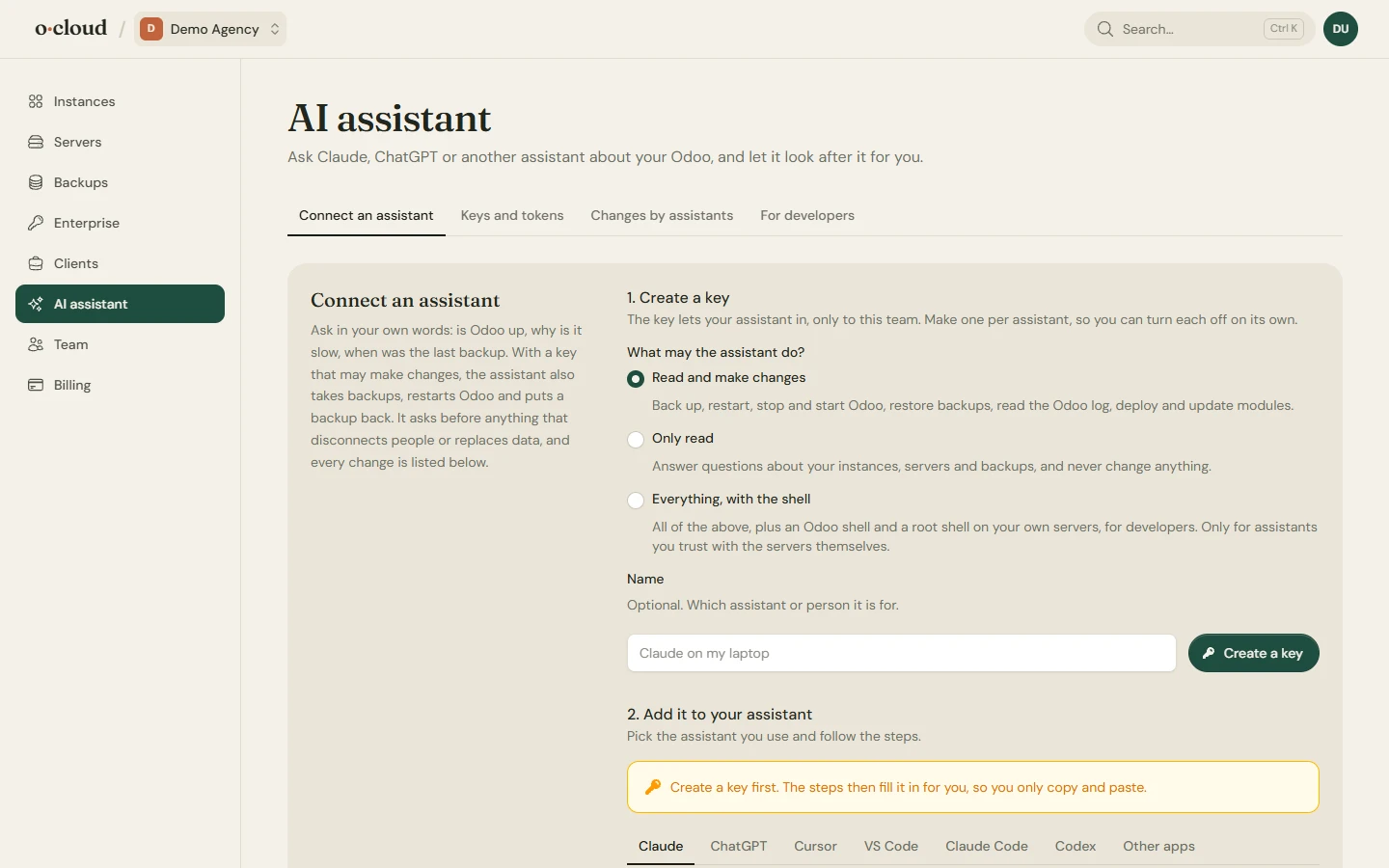
Make a key on the AI assistant page, one per assistant so each can be turned off on its own. A key has one of three levels:
| Access | Who can make it | What it may do |
|---|---|---|
| Only read | Owners, admins, members | Every tool that only looks: the account overview, an instance and its health, backups, recent activity, logs, modules. |
| Read and make changes | Owners, admins, members | Also back up, restart, stop, start, restore, deploy and update modules. |
| Everything, with the shell | Owners and admins | Also the Odoo shell and a root shell on the team's own servers. |
Shell access follows the terminal: a key only opens a shell while the person who made it is still an owner or admin. Tools a key may not use are not shown to it. Every change made with a key is listed under Changes by assistants with the key's name, and changes are limited to 30 a minute per key.
Connecting an assistant
Pick the assistant on the page and follow the steps with the key filled in:
- Claude Code and Codex: one command to add the server.
- Cursor and VS Code: a one-click install link.
- claude.ai and ChatGPT: a connector link that carries the key in its address, for apps that take only a URL. Anyone with the link has the key; turning the key off turns the link off.
- Anything else that speaks MCP over HTTP: the address and the key as a bearer token.
Two servers, one key
- The assistant server is for business owners, in plain words: is Odoo up, is it slow, what changed, take a backup, restart. It asks before anything that disconnects people or replaces data.
- The developer server is for coding assistants: servers, instances, backups, the end of a task's output, the log, the modules, and the actions a deploy needs. With a shell key it also runs Python in the Odoo shell (rolled back unless committed) and bash as root on the team's own servers.
The one connector people add to Claude or ChatGPT does everything its key allows on both.
REST API
For scripts and CI, with the same keys as a bearer token:
GET  /api/v1/servers
GET  /api/v1/instances
GET  /api/v1/backups
POST /api/v1/instances/{id}/deploy
POST /api/v1/instances/{id}/restart
POST /api/v1/instances/{id}/start
POST /api/v1/instances/{id}/stop
POST /api/v1/instances/{id}/update_modules
POST /api/v1/instances/{id}/backups
A read-only key may only use the GET routes.